Y2K Photo Editor
Restyle a portrait as a colorful 2000s bedroom scene
Upload your photo
Drag and drop, or choose a file from your device.
Before & After: Y2K Filter
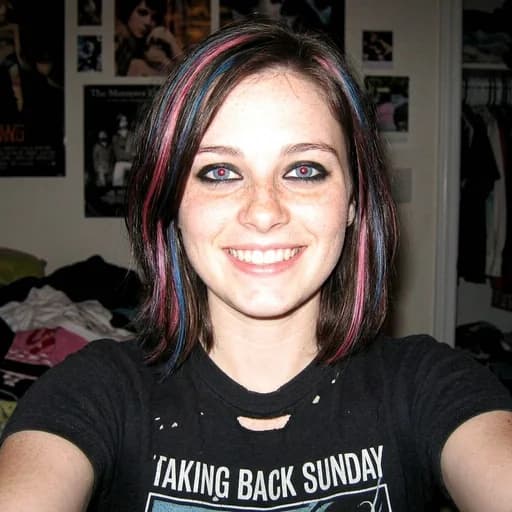
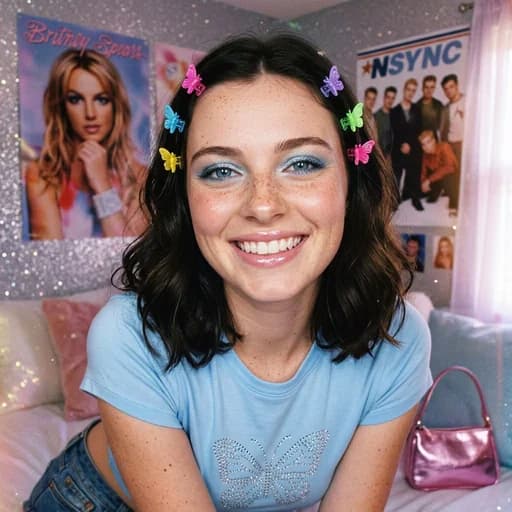
Example: left, plain portrait; right, Y2K bedroom scene with clips and pop posters. Drag to compare.

Before
After
Tap to compare
What this filter changes
Restyle a portrait with a Y2K photo effect. In the example above, butterfly clips, blue eye shadow, a rhinestone T-shirt and pop posters turn a plain portrait into a colorful early-2000s bedroom scene.
Try it for: An early-2000s profile picture. Use the colorful bedroom portrait as a playful avatar or a visual reference for a Y2K theme.
How to use this filter
Upload here, then continue in the editor.
1. Upload a portrait
Start with a photo of the person you want to place in a 2000s-inspired scene.
2. Generate the Y2K version
The filter opens already selected in the editor; generate to see the restyled portrait.
3. Compare the details
Check the makeup, clothing, pose and new background against your original.
Tips & limitations
- In this example, the outfit, pose and background change together. Check the eyes, smile and freckles against your original before sharing the scene.
Last reviewed by PicTools.AI editorial.
Y2K Filter FAQs
Upload a portrait and continue in the editor with the Y2K filter selected. Generate the restyle, then compare it with your original.
You can try PicTools.AI with a limited free allowance. Continue in the app to check the allowance available to your account. More edits require a credit pack or subscription.
In the example above, the dark hair, freckles and smile remain visible, while the pose, makeup, outfit and background change. Check the facial details against your original.
The Y2K example adds bright clips, blue eye shadow and pop posters in a decorated room. The 90s example uses a gray sweatshirt, a TV and a quieter indoor scene with a date stamp.
The example above shows a 2000s-inspired scene, but no visible date stamp. Compare it with the 90s example if you want to see a stamped photo look.